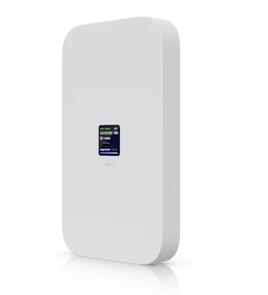
 Ubiquiti U5G-MAX-OUTDOOR 5G outdoor modem for UniFi consoles and Cloud Gateways
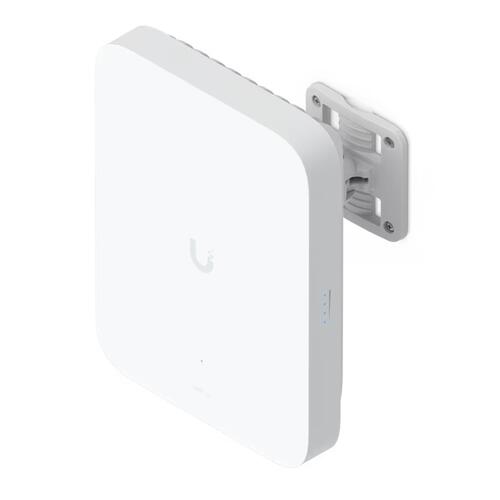
Ubiquiti U5G-Max-Outdoor is a weather-resistant 5G modem with directional antennas, dual SIM, 2.5 GbE PoE and integrated UniFi management.
Ubiquiti UniFi 5G Max Outdoor – U5G-Max-Outdoor
The Ubiquiti UniFi 5G Max Outdoor is a weather-resistant 5G cellular modem designed to provide primary or failover internet connectivity to a compatible UniFi Cloud Gateway or UniFi Console. It combines high-performance 5G connectivity, directional antennas, dual-SIM support, a 2.5 GbE PoE interface and centralised UniFi management in an enclosure built for outdoor installation.
Important: The U5G-Max-Outdoor is not a standalone router or Wi-Fi access point. It must be adopted and managed through a compatible UniFi deployment, with a UniFi Cloud Gateway or Console providing routing, firewall, DHCP and other network services.
Outdoor 5G connectivity for UniFi networks
Installing a cellular modem outdoors can substantially improve reception where roofing, walls or low-emissivity glass weaken indoor mobile signals. The U5G-Max-Outdoor places the cellular modem and its integrated directional antennas close to the best available signal, while a single Ethernet cable carries both data and power back into the network.
The modem supports 5G NR and 4G LTE connectivity, with a stated maximum cellular data rate of up to 3.4 Gbps. Actual performance depends on the mobile operator, supported frequency bands, signal quality, tower capacity, data plan and local network conditions.
A cellular modem, not a standalone router
The U5G-Max-Outdoor extends a UniFi network with cellular WAN connectivity; it does not replace the network gateway.
A complete deployment requires:
- A compatible UniFi Cloud Gateway or UniFi Console
- A PoE network connection to the UniFi deployment
- A compatible activated cellular data service
- UniFi Network version 10.0.162 or later
- An alternative internet connection during initial setup, if the UniFi gateway or console requires updating before adoption
The connected UniFi gateway continues to handle routing, firewall security, VLANs, VPNs, DHCP and internet failover policies. This distinction makes the U5G-Max-Outdoor particularly well suited to existing UniFi networks requiring an integrated cellular WAN connection without introducing a separately managed 5G router.
Directional antennas for stronger outdoor reception
Integrated directional cellular antennas allow the modem to be aimed towards the best available mobile tower or signal source. This can be particularly useful for rural properties, industrial sites, warehouses and buildings where the equipment room is poorly positioned for cellular reception.
The integrated design also avoids the signal loss that can occur when a remotely mounted antenna is connected to an indoor modem using long coaxial cables.
Primary WAN or automatic 5G failover
When paired with a compatible UniFi gateway, the U5G-Max-Outdoor can provide cellular connectivity as either a primary internet service or a resilient backup to fibre, fixed wireless or another wired WAN connection.
For failover applications, UniFi can automatically transfer internet traffic to the cellular service when the primary WAN becomes unavailable. This helps keep cloud applications, payment systems, remote access, security systems and other essential services connected during an ISP outage.
Dual-SIM flexibility and service resilience
Dual-SIM functionality provides flexibility when selecting mobile services and can support failover between cellular connections. This allows installers to design around coverage differences between mobile operators or provide an additional level of WAN resilience.
SIM format, carrier support, frequency compatibility and activation requirements should be confirmed for the intended New Zealand or Pacific mobile network before deployment. A suitable data plan is required.
Ubiquiti also lists Remote SIM functionality for this platform, but advises that this capability is planned for a future software update and should not be treated as available at the time of purchase.
2.5 GbE connection with PoE power
A single 2.5 GbE RJ45 port connects the modem to the UniFi network and supplies its power through PoE. This reduces outdoor cabling requirements and allows the device to be positioned away from the gateway, wherever cellular reception is strongest.
The 2.5 GbE interface provides sufficient wired capacity for high-speed 5G services without imposing the one-gigabit ceiling found on conventional Gigabit Ethernet cellular devices. Cellular speeds remain dependent on the connected mobile network and service plan.
Weather-resistant wall or pole installation
The enclosure is designed for exposed outdoor locations and carries IPX6 and IP67 weather-resistance ratings. Its aluminium-alloy and UV-stabilised polycarbonate construction is suited to long-term outdoor deployment.
Wall and pole mounting options allow the modem to be securely positioned and aimed for the best available signal. Installers should maintain appropriate cable routing, weatherproofing and lightning or surge-protection practices for the site.
Centralised management through UniFi
Once adopted, the U5G-Max-Outdoor becomes part of the UniFi management environment. Administrators can monitor the cellular connection alongside the gateway, switches, access points and other UniFi infrastructure rather than using a separate third-party modem interface.
This unified approach simplifies deployment and ongoing support for MSPs, installers and organisations already standardised on UniFi.
Suitable applications for the U5G-Max-Outdoor
The UniFi 5G Max Outdoor is suitable for:
- Cellular backup for business UniFi networks
- Rural or semi-rural locations with stronger reception outdoors
- Warehouses and industrial buildings with poor indoor cellular coverage
- Temporary offices and construction sites
- Remote facilities requiring centrally managed connectivity
- Primary 5G internet where fixed-line services are unavailable
- Resilient connectivity for payment, security or operational systems
U5G-Max-Outdoor compared with U5G-Max
Both models provide high-performance 5G connectivity for UniFi deployments. The standard U5G-Max is intended for indoor placement, while the U5G-Max-Outdoor adds a weather-resistant enclosure, outdoor mounting and directional antennas.
Choose the U5G-Max-Outdoor when the modem needs to be mounted externally or aimed towards a mobile tower. The indoor U5G-Max may be more convenient where strong cellular reception is already available inside the building.
|
Specification |
Details |
|---|---|
|
Product type |
Outdoor 5G cellular modem for compatible UniFi deployments |
|
Model |
U5G-Max-Outdoor |
|
Standalone router |
No |
|
Routing and firewall |
Provided by the connected UniFi Cloud Gateway or compatible UniFi Console |
|
Cellular technologies |
5G NR and 4G LTE |
|
Maximum stated cellular rate |
Up to 3.4 Gbps; actual performance depends on the carrier, signal and service |
|
SIM capability |
Dual-SIM support, including eSIM functionality |
|
Remote SIM |
Planned for a future software update |
|
Cellular antennas |
Integrated directional antennas |
|
Network interface |
1 × 2.5 GbE RJ45 |
|
Power method |
PoE |
|
Maximum power consumption |
14.5 W |
|
Management |
UniFi Network |
|
UniFi Network requirement |
Version 10.0.162 or later |
|
Initial adoption requirement |
An alternative internet connection may be required to update the UniFi gateway or console before adoption |
|
Dimensions |
220 × 165 × 66.9 mm |
|
Dimensions with mount |
220 × 165 × 122 mm |
|
Enclosure materials |
Aluminium alloy and UV-stabilised polycarbonate |
|
Weather resistance |
IPX6 and IP67 |
|
Mounting |
Wall or pole mounting |
|
Reset control |
Factory-reset button |
|
Status indication |
Integrated LEDs |
|
Primary applications |
Cellular WAN, fixed-line replacement and automatic internet failover |
|
Wi-Fi access point |
No |
|
Cellular data plan |
Required; carrier and band compatibility must be confirmed before deployment |