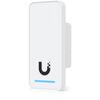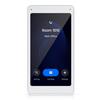
 Ubiquiti UA-G3-INTERCOM UniFi G3 Access Intercom with Camera and Keypad
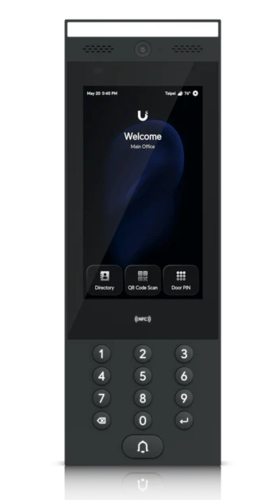
Ubiquiti UA-G3-Intercom UniFi Access G3 Video Intercom with Touch Pass
The Ubiquiti UA-G3-Intercom is an advanced indoor/outdoor video intercom and access reader for UniFi Access-controlled doors and gates. Combining an integrated camera, full-duplex two-way audio, a bright 7-inch touchscreen and multiple credential options, it allows visitors to call staff while authorised users gain entry using NFC credentials, PIN codes, mobile access, face recognition or Apple and Google Wallet passes. The UA-G3-Intercom connects directly to a compatible UniFi Access Control Hub using PoE, creating an integrated visitor-management and door-unlocking solution for offices, apartment buildings, gated properties and commercial entrances.
Advanced UniFi video intercom for doors and gates
The UA-G3-Intercom provides a single entry-point terminal for visitor screening, directory calling and credential-based access. Visitors can select a person from the on-screen directory or enter a directory number before initiating a call.
Authorised recipients can see and speak with the visitor through the UniFi Access or UniFi Endpoint mobile application, a compatible UniFi Talk phone, or an optional UA-Intercom-Viewer. Depending on system configuration and permissions, the recipient can then remotely unlock the connected door or gate.
7-inch touchscreen with integrated directory
A 7-inch capacitive touchscreen provides a clear and intuitive interface for visitors and authorised users. Its typical maximum brightness of 1,000 nits helps keep information visible at outdoor entrances and in brightly lit environments.
The integrated directory makes the UA-G3-Intercom particularly suitable for multi-tenant buildings, shared offices and larger organisations where visitors need to contact a specific person, department or occupant.
Multiple secure door-unlock methods
The Ubiquiti UA-G3-Intercom supports a broad range of access methods, allowing organisations to provide different credentials for employees, contractors, tenants and visitors.
Supported access methods include:
- NFC access cards and keyfobs
- PIN-code access
- UniFi Identity mobile unlock
- Apple and Google Wallet passes
- Apple Touch Pass support
- Face unlock
- Remote unlocking by an authorised call receiver
Access permissions, users, schedules and activity can be centrally administered through the UniFi Access application.
Integrated camera and full-duplex two-way audio
The built-in camera provides a portrait-oriented view of visitors, while the integrated microphone and speaker enable full-duplex, echo-controlled conversations. Staff can view and speak with visitors before deciding whether to unlock the entrance.
The intercom can also contribute visual records to the wider UniFi deployment when UniFi Access and UniFi Protect are running on the same compatible console and the necessary recording infrastructure is installed.
Designed for indoor and outdoor entrances
With IP65 weather protection, a robust aluminium-alloy enclosure and an operating temperature range suited to exposed locations, the UA-G3-Intercom can be installed at indoor or outdoor doors, building entrances and vehicle gates.
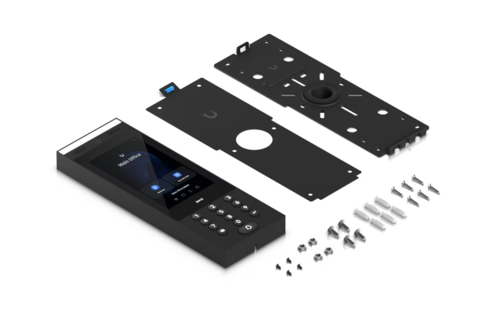
A wall mount and gooseneck-pedestal adapter are included. Optional surface-angle, wedge, flush-mount and sunshield accessories allow the intercom to be positioned for improved visibility, camera coverage and weather protection.
PoE connectivity through a UniFi Access Control Hub
The UA-G3-Intercom uses a single Gigabit Ethernet connection for network communication and 48V PoE power. For door-unlock operation, it must be paired with or directly connected to a compatible UniFi Access Control Hub.
For a compact single-door installation, the UA-Hub-Door-Mini is a suitable choice. It connects to the network using PoE++ and provides the lock-control interface and PoE connection required by the intercom.
The UA-G3-Intercom consumes up to 13W and should be installed using Cat5e or better cabling.
Items required for a complete UA-G3-Intercom installation
At a minimum, an operational door-access installation requires:
- Compatible UniFi Access Control Hub: Such as the UA-Hub-Door-Mini for a single door, UA-Hub-Door or UA-Hub-Gate, depending on the application.
- UniFi Console: A compatible UniFi console capable of running the UniFi Access application.
- PoE infrastructure: A suitable PoE++ switch port or power source for the selected Access Control Hub. The hub supplies PoE to the intercom.
- Network cabling: Cat5e or better Ethernet cable between the switch, Access Control Hub and UA-G3-Intercom.
- Compatible electric lock: An electric strike, magnetic lock, bolt lock or compatible gate-controller interface.
- Call receiver: A smartphone running the UniFi Access or UniFi Endpoint application, a compatible UniFi Talk phone, or an optional UA-Intercom-Viewer.
- Appropriate lock and control cabling: Sized according to the lock’s current requirements and cable distance.
Depending on the entrance design and applicable building regulations, the installation may also require:
- Door-position sensor
- Request-to-exit button
- Exit-side UniFi Access reader, such as the UA-G3-W
- Emergency-release or break-glass device
- NFC cards or keyfobs
- Dedicated lock power supply where required
- UPS backup for the UniFi Console, network switch and access-control equipment
- Optional intercom mounting accessories
The UA-Intercom-Viewer is not mandatory if authorised personnel will answer calls using supported mobile applications. It is recommended when reception, security or another fixed location requires a dedicated answering screen.
Ubiquiti UA-G3-Intercom technical specifications
|
Specification |
Details |
|---|---|
|
Product model |
UA-G3-Intercom |
|
Product type |
UniFi Access video intercom and access reader |
|
Recommended applications |
Commercial entrances, offices, apartment buildings, multi-tenant properties and vehicle gates |
|
Indoor/outdoor use |
Yes |
|
Weather protection |
IP65 |
|
Display |
7-inch capacitive multi-touchscreen |
|
Display resolution |
1024 × 600 pixels |
|
Display brightness |
Up to 1,000 nits typical |
|
Integrated camera |
Yes |
|
Camera video resolution |
2MP, 1200 × 1600 |
|
Camera optical sensor resolution |
8MP, 2448 × 3264 |
|
Maximum frame rate |
30fps |
|
Camera field of view |
79.4° horizontal, 97.5° vertical, 118.2° diagonal |
|
Two-way audio |
Full-duplex audio with integrated microphone and speaker |
|
Speaker |
Integrated 2W speaker |
|
Directory calling |
Yes |
|
Doorbell calling |
Yes |
|
NFC access |
Yes |
|
NFC frequency |
13.56MHz |
|
NFC read range |
Less than 30mm |
|
NFC standards |
ISO/IEC 14443A, 14443B, 15693 and 18092; MIFARE Classic, MIFARE DESFire, Sony FeliCa ID and supported NFC Forum tags |
|
PIN access |
Yes |
|
Mobile access |
UniFi Identity mobile unlock |
|
Mobile wallet access |
Apple and Google Wallet |
|
Touch Pass |
Supported |
|
Face unlock |
Supported |
|
Bluetooth |
BLE 4.2 |
|
Network interface |
1 × Gigabit Ethernet RJ45 |
|
Power method |
48V PoE through a compatible UniFi Access Control Hub |
|
Maximum power consumption |
13W |
|
Enclosure material |
Aluminium alloy, UV-stabilised polycarbonate and glass |
|
Mount material |
Powder-coated stainless steel |
|
Included mounting options |
Wall mount and gooseneck-pedestal adapter |
|
Optional mounting accessories |
Surface-angle mount, wedge mount, flush mount and sunshield |
|
Dimensions |
324.8 × 113.7 × 28.3mm |
|
Device weight |
965g |
|
Mounting bracket weight |
445g |
|
Device operating temperature |
-30°C to 60°C |
|
Display operating temperature |
-25°C to 60°C |
|
Operating humidity |
5–90% non-condensing |
|
Management platform |
UniFi Access |
|
Minimum recommended cabling |
Cat5e or better |
|
Certifications |
CE, FCC, IC, UL 294 and CAN/ULC-60839-11-1 |
|
NDAA compliant |
Yes |