 Ubiquiti UA-G3-W UniFi Access Reader G3 with Apple Touch Pass Support
Compact UniFi door access for offices and commercial premises
The UniFi UA-G3-W is well suited to businesses wanting a discreet, centrally managed access reader without the size or cost of a touchscreen intercom. Its support for physical NFC credentials, mobile unlocking and Apple or Google Wallet Touch Pass makes it adaptable to traditional card-based systems and mobile-first workplaces.
When paired with a compatible UniFi Access Hub and UniFi Console, it provides a scalable entry-control solution with central credential administration, configurable schedules and detailed access-event reporting.
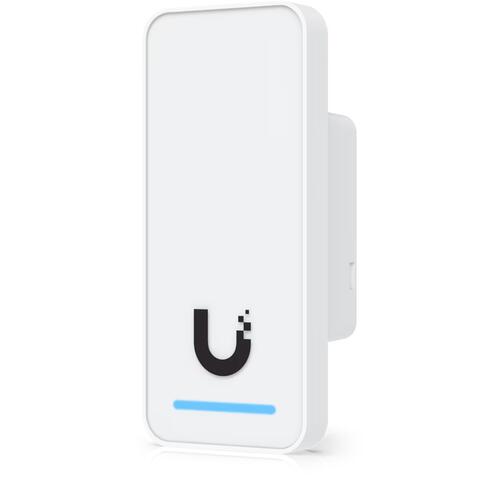
The UniFi UA-G3-W Access G3 Reader is a compact, third-generation door access reader designed for modern offices, commercial buildings and managed facilities. Finished in white and suitable for indoor or outdoor installation, it supports encrypted NFC cards and keyfobs, mobile unlocking, hand-wave request-to-exit and UniFi Touch Pass credentials stored in Apple Wallet or Google Wallet. When connected to a compatible UniFi Access Control Hub, the UA-G3-W provides centrally managed, contactless entry through the UniFi Access application.
UniFi Access G3 Reader with Apple Wallet Touch Pass
UniFi Touch Pass lets authorised users unlock a door by tapping a compatible iPhone, Apple Watch or Android device against the reader. There is no need to find and open an application before entering.
On supported Apple devices, Express Mode can allow users to present their credential without first unlocking the device. Apple’s Power Reserve functionality may also keep an access badge available for a limited period after an iPhone’s battery is depleted.
Touch Pass credentials are assigned by an administrator and added to the user’s digital wallet through the UniFi Endpoint application. This gives organisations a convenient alternative to issuing and replacing physical access cards.
A one-time allocation of 10 complimentary Touch Passes for one year is currently offered when the first compatible G3 reader is adopted on an eligible UniFi Access console. Additional credentials and continued use beyond the promotional period may require purchased Touch Passes. Availability and terms should be checked at the time of deployment.
Multiple secure door-unlock options
The UA-G3-W supports several convenient credential methods:
- UniFi NFC access cards and keyfobs
- Compatible 13.56MHz third-party NFC credentials
- Touch Pass through Apple Wallet or Google Wallet
- Mobile unlock through the UniFi Endpoint application
- Hand-wave request-to-exit when configured as an exit reader
- Remote door release by an authorised UniFi Access administrator
The reader does not include a keypad, camera or touchscreen. Sites requiring PIN entry, video verification or two-way visitor communication should consider a UniFi Reader Flex, G3 Reader Pro or G3 Intercom instead.
Compact indoor and outdoor access reader
Measuring only 93 × 40 × 36.5mm, the Access G3 Reader is suitable for door frames and entrances where installation space is limited. Its IP55-rated enclosure permits indoor and outdoor deployment in an appropriate installation environment.
The proximity sensor detects a user approaching or presenting a credential, while the integrated speaker and multicolour status LED provide immediate feedback when access is granted or denied. The white UA-G3-W finish provides a discreet appearance against light-coloured walls and door frames.
PoE connectivity and simplified installation
The UA-G3-W uses a single Ethernet connection for data and PoE power. In a normal door-control installation, the reader connects to a dedicated reader port on a compatible UniFi Access Control Hub.
The hub securely controls the electric lock and provides the relevant connections for devices such as door-position sensors, request-to-exit buttons and emergency inputs. This architecture keeps the lock-control relay on the secure side of the door instead of placing it inside the externally accessible reader.
Cat5e or better network cabling is recommended. For retrofit installations where new Ethernet cabling cannot easily be installed, UniFi two-wire retrofit accessories may provide an alternative, subject to site design and compatibility requirements.
Centralised management with UniFi Access
The UniFi Access application provides centralised control over readers, doors, users and credentials. Administrators can use it to:
- Add and remove users
- Issue NFC and Touch Pass credentials
- Define door-access permissions
- Create access groups
- Apply time-based entry schedules
- Remotely unlock doors
- Review entry and access-denied events
- Receive door and device notifications
- Manage multiple entrances from one interface
- Revoke lost or compromised credentials promptly
UniFi’s integrated platform can also bring networking, video surveillance and door access together under a compatible UniFi Console.
Minimum additional UniFi equipment required
The UA-G3-W is a reader only. It cannot independently operate an electric lock or host the UniFi Access application.
At a minimum, a functioning single-door solution requires:
|
Required item |
Purpose |
Example |
|---|---|---|
|
UniFi Console supporting the Access application |
Hosts and manages the UniFi Access software |
UniFi Dream Machine Special Edition or another console specifically supporting UniFi Access |
|
UniFi Access Control Hub |
Connects the reader and securely controls the door lock |
UniFi Door Hub or compatible single-door Access Hub |
|
Suitable PoE power source for the Access Hub |
Powers the hub at its required PoE level |
Compatible UniFi PoE switch or correctly rated UniFi PoE adapter |
|
Ethernet cabling |
Connects the console/network, hub and reader |
Cat5e or better |
|
Compatible electric locking hardware |
Physically secures and releases the door |
Electric strike, electric bolt or magnetic lock |
Depending on the chosen lock, the hub and the installation, a separate lock power supply may also be required. UniFi Access supports powered and dry-relay lock connections, but the lock’s voltage and current requirements must be matched to the hub output.
Commonly required installation components
Although not always essential for a basic demonstration, most operational access-control installations will also require:
- Door-position sensor
- Request-to-exit button or sensor
- Emergency release or break-glass device
- Suitable electric strike, bolt or magnetic lock
- Access cards or keyfobs for users not using Touch Pass
- Junction box or appropriate reader mounting hardware
- Backup power for the hub and locking system
- Appropriate fire-alarm and emergency-egress integration
Access-control and locking hardware must be installed in accordance with applicable building, fire-safety and emergency-egress requirements.
UniFi UA-G3-W technical specifications
|
Specification |
Details |
|---|---|
|
Manufacturer |
Ubiquiti |
|
Product family |
UniFi Access |
|
Model |
UA-G3-W |
|
Product type |
Third-generation compact access reader |
|
Colour |
White |
|
Management application |
UniFi Access |
|
Supported credentials |
NFC cards, NFC keyfobs, Touch Pass and mobile unlock |
|
Digital wallet support |
Apple Wallet and Google Wallet through Touch Pass |
|
Hand-wave request-to-exit |
Supported |
|
NFC frequency |
13.56MHz |
|
NFC read range |
Less than 30mm |
|
NFC technologies |
ISO/IEC 14443A, 14443B, 15693 and 18092; MIFARE Classic, MIFARE DESFire, Sony FeliCa ID and NFC Forum tags |
|
Network interface |
1 × 10/100Mbps Ethernet RJ45 |
|
Wireless connectivity |
Bluetooth 4.1 and NFC |
|
Power method |
48V DC PoE |
|
Maximum power consumption |
5W |
|
Sensors |
Proximity sensor |
|
Audible indication |
Integrated speaker |
|
Visual indication |
Red, green, blue and white status LEDs |
|
Reset control |
Factory-reset button |
|
Dimensions |
93 × 40 × 36.5mm |
|
Weight |
82g |
|
Enclosure material |
Polycarbonate and glass |
|
Mount material |
Aluminium alloy |
|
Mounting |
In-wall or gang-box mounting included; optional junction box |
|
Indoor/outdoor use |
Yes |
|
Weather resistance |
IP55 |
|
Operating temperature |
-30°C to 45°C |
|
Operating humidity |
5–90% non-condensing |
|
ESD/EMP protection |
±15kV air, ±8kV contact |
|
Recommended cable |
Cat5e or better |
|
Compliance |
NDAA compliant |
|
Certifications |
CE, FCC, IC, SRRC, UL 294 and CAN/ULC-60839-11-1 |