 Ubiquiti UP-VIEWPORT Ubiquiti UniFi Protect ViewPort - Easy-to-use hub for viewing Protect camera feeds on an HDMI display
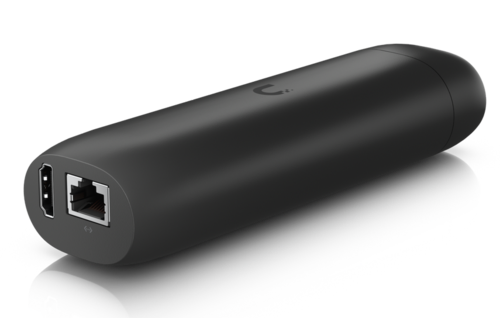
- Flexible mounting
- 16-stream matrix view support
- Connect and power using PoE
- HDMI video output up to 4K @ 30 FPS
The UniFi Protect ViewPort allows you to view your UniFi Protect camera feeds on an HDMI display. It uses Power over Ethernet and connects to the local network hosting your cameras and connects via HDMI to a display. The UniFi Protect ViewPort offers 4K video output at 30 frames per second. Protect systems can be viewed in custom high-density camera matrix configurations.
Mechanical
Dimensions : 157 x 52 x 37 mm (6.2 x 2.1 x 1.5")
Weight : Without mount: 230 g (8.1 oz) With TV mount: 252 g (8.9 oz)
Enclosure Material : Polycarbonate
Mount Material : Polycarbonate
Hardware
Networking Interface : (1) GbE RJ45 port
Power Method : PoE
Max. Power Consumption : 9.5W
ESD/EMP Protection : Air: ± 8kV, contact: ± 4kV
Buttons : (1) Factory reset
Ambient Operating Temperature : 0 to 40° C (32 to 104° F)
Ambient Operating Humidity : 20 to 80% noncondensing
NDAA Compliant
Certifications : FCC, IC, CE, Anatel: 06681-25-08356
Software
Application Requirements
Web Application
UniFi Protect
Mobile App
UniFi Protect iOS™ and Android™
Mechanical
Dimensions : 157 x 52 x 37 mm (6.2 x 2.1 x 1.5")
Weight : Without mount: 230 g (8.1 oz) With TV mount: 252 g (8.9 oz)
Enclosure Material : Polycarbonate
Mount Material : Polycarbonate
Hardware
Networking Interface : (1) GbE RJ45 port
Power Method : PoE
Max. Power Consumption : 9.5W
ESD/EMP Protection : Air: ± 8kV, contact: ± 4kV
Buttons : (1) Factory reset
Ambient Operating Temperature : 0 to 40° C (32 to 104° F)
Ambient Operating Humidity : 20 to 80% noncondensing
NDAA Compliant
Certifications : FCC, IC, CE, Anatel: 06681-25-08356
Software
Application Requirements
Web Application
UniFi Protect
Mobile App
UniFi Protect iOS™ and Android™