 Yealink A25-BYOM BYOM A25 MeetingBar
BYOM
Bring Your Own Meeting — use your laptop's preferred meeting application while leveraging the room's AV equipment.
BYOM stands for Bring Your Own Meeting. It means users can connect their own laptop to the room system and use the A25's camera, microphones, and speaker with whatever conferencing platform they prefer — such as Microsoft Teams, Zoom, Cisco Webex, or Google Meet.
The A25-BYOM is essentially a USB-connected room peripheral. Yealink describes it as supporting a one-cable USB-C connection that enables BYOD/BYOM operation from a user's PC.
So the difference between an A25 and an A25-BYOM is that the BYOM version is specifically designed around USB-connected meeting experiences, where the user's laptop drives the meeting platform, rather than the room system running Teams Rooms or Zoom Rooms natively.
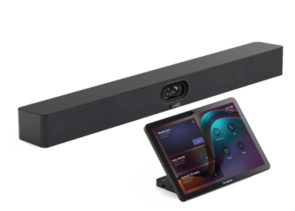
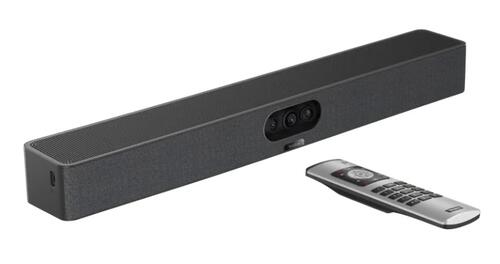
Yealink A25-BYOM is an all-in-one collaboration video bar designed for focus rooms. It combines a triple camera system with 151° ultra-wide viewing angle and 4K output to capture every participant, while an eight-element MEMS microphone array and built-in speaker with intelligent noise reduction deliver clear audio. A single USB-C cable provides simple BYOM connectivity, and network-based management reduces IT workload.
- 151° ultra-wide-angle triple camera captures all participants in focus room
- 4K video at 30 fps delivers clear image details for remote viewers
- A USB-C cable enables easy BYOM connection to a meeting PC
- 8-element MEMS microphone array with 5m range and intelligent noise reduction
- Network-based device management and automatic lens cover simplify operations
A25-BYOM in brief:
Triple camera system with 151° ultra-wide angle, suitable for bringing all participants into focus and providing detailed close-ups for remote participants.
Single-cable USB-C BYOM workflow to quickly connect a laptop and start meetings without complex setup.
Integrated audio with an 8-element MEMS microphone array, 5m range and intelligent noise reduction for reliable voice recording and playback.
AI features like IntelliFocus, speaker tracking, picture-in-picture, and Video Fence to reduce distractions and keep meetings focused.
Designed for focus rooms, so confirm room layout and microphone recording needs when planning installation.
Camera and video
The camera system provides wide coverage and detailed images to enhance the viewing experience for remote participants. Autoframing, speaker tracking, and IntelliFocus automatically detect and frame speakers. Multistream output and picture-in-picture help remote participants follow both the room and the active speaker without manual switching.
Sound and connectivity
A built-in eight-element MEMS microphone array and a dedicated speaker handle voice recording and playback for small meeting rooms. Intelligent noise cancellation and full-duplex audio provide clearer two-way conversations. In terms of connectivity, the bar supports one USB-C connection for BYOM and standard video outputs for room integrations, so you can connect a laptop or room PC with minimal cabling.
Implementation and administration
The integrated design makes installation simple: mount the bar, connect power and network, and you’re ready to manage the device remotely via your management platform. The device includes a privacy lens cover and basic mounting hardware to speed deployment. A two-year warranty helps protect your investment and makes lifecycle planning easier.