 DrayTek DV2928 8-Port Multi-WAN Router, 1x GbE WAN, 1x 10GbE SFP+ WAN, 1x 10GbE WAN/LAN, 1x 10G SFP+ LAN, 3x GbE LAN, Firewall, CSM, QoS, VPN
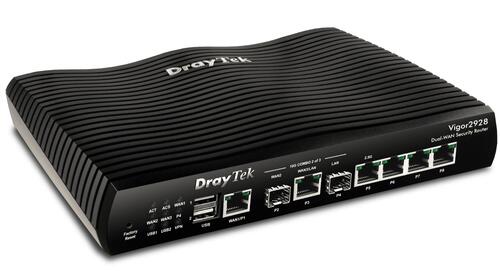
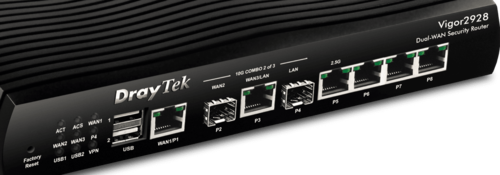
10GB WAN VPN Security Router
Vigor2928 is a Dual-WAN VPN Router with high-speed 10G connectivity through three versatile interfaces. Featuring VPN, QoS, route policy, web content filtering, hotspot web portal, and more.
- Ready to connect UFB
- Multi-WAN for Failover, Load Balancing and High Availability mode
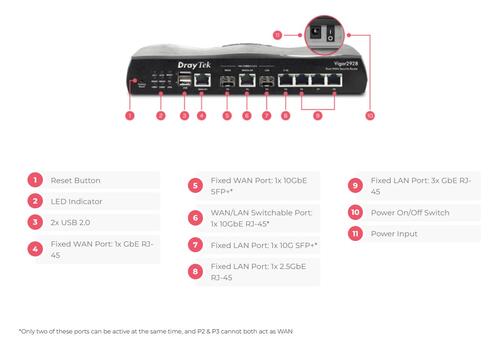
- 1 x fixed GbE WAN port (P1)
- 1 x 10GbE WAN/LAN port (P3)
- 1 x fixed SFP+ WAN port (P2)
- 1 x 10Gb SFP+ LAN slot (P4)
- 1 x fixed 2.5GbE LAN port (P5)
- 3 x fixed GbE LAN ports (P6~P8)
- 2 x USB 2.0 ports for connection to two 4G LTE USB modems, FTP server, network printer and thermometer
- Up to 8 subnets and 60,000 NAT sessions
- Up to 50 x VPN tunnels with comprehensive secure protocols
- IPsec VPN throughput up to 540 Mbps (AES 256 bits)
- WireGuard VPN throughput up to 85 Mbps
- Object-based SPI Firewall, Content Security Management (CSM), URL/IP Reputation and Port Knocking*
- IAM (Identity and Access Management) to enhance security management and user experience
- IPv6 & IPv4
- Virtual AP Controller for the deployment of up to 20 wireless VigorAPs
- Virtual Switch Controller to manage up to 10 VigorSwitches
- Supports VigorACS 3 Central Management Software for remote management
(For P2~P4, any two of these three ports can be used simultaneously, and port P3 can also be configured as a high-speed LAN port when not serving as the WAN)
The Vigor2928 is a Dual-WAN VPN router equipped with three 10G interfaces, supporting both Ethernet and fiber connections. As DrayTek’s first router with a 10G Ethernet WAN, it delivers high-performance WAN connectivity for bandwidth-intensive networks.
The Vigor2928 supports advanced features, including load balancing, VPN, QoS, IP/URL filtering, and a hotspot portal with built-in IAM to enhance network security. It also functions as a virtual controller for the centralized management of VigorAPs and VigorSwitches.
10GbE WAN/LAN Switchable
10M/100M/1G/2.5G/10G Ethernet, RJ-45
10G SFP+
1G/10G SFP Slot
50 VPN
IPsec throughput up to 540 Mbps
60k Sessions
Recommended for a network of 50 hosts
Key Features
10G SFP+
Supports 10G-capable fiber SFP+ ports for high-speed fiber WAN or LAN connectivity.
10GbE
Provides ultra-fast 10G connectivity to meet the needs of high-demand network.
2.5GbE
Provides higher performance to Wi-Fi 6 AP and other Ethernet devices.
Load Balancing
Maximize throughput and reliability by using multiple Internet connections.
Bandwidth Management
Prevent one device using all the bandwidth by bandwidth limit policy, session limit policy, and QoS settings.
DrayDDNS
Free DDNS service to access the router using a fixed hostname of your choice.
VPN (Virtual Private Network)
Build a secure and private tunnel from the LAN of Vigor2928 to the remote offices and teleworkers over the Internet.
EasyVPN
Secure VPN in Seconds: No Keys, No Configs, Just Login.
Firewall & Content Filter
Filter web pages by URL keyword or web category to block access to insecure or inappropriate contents.
URL/IP Reputation
Improve network security by classifying URLs and IPs to control web access and protect against online threats.
Port Knocking
Add a stealth security layer to protect ports from unauthorized access.
IAM
A solution that manages digital identities, authentication, and access control to ensure the right users or groups have appropriate access to critical resources.
Hotspot Web Portal
Market your business and communicate with the guests while offering hospitality WLAN.
Virtual AP/Switch controller
All-in-one management platform for Vigor2928 to maintain and monitor the VigorAPs and VigorSwitches.
Multiple 10G WAN Load Balancing
WAN Load Balancing
Vigor2928 offers high throughput with load balancing, ideal for fiber and 10 Gigabit Internet. All active WAN interfaces join the Load Balance Pool to optimize bandwidth utilization.
Seamless Failover
Supports automatic WAN failover to maintain seamless internet connectivity during ISP outages, minimizing downtime and associated costs.
Policy-Based Routing
Routing policies allows user to assign specific WAN interfaces to applications, VoIP, or traffic by source or destination, enhancing network efficiency and performance.
Effortless and Secure VPN Access with EasyVPN
Setting up a VPN can often be complex, involving protocol selection, manual configurations, and troubleshooting, especially for non-technical users. While Vigor routers support advanced VPN protocols such as IPsec, WireGuard, and OpenVPN, traditional setup methods can be time-consuming and daunting.
EasyVPN simplifies this process by offering a streamlined, hassle-free solution for secure remote connectivity. With EasyVPN, users can quickly establish encrypted connections without the need to:
- Manually generate WireGuard keys
- Import OpenVPN configuration files
- Upload certificates
By automating these steps, EasyVPN delivers a fast, secure, and intuitive VPN experience, perfect for businesses and users who want robust protection without the technical complexity.
IAM (Identity and Access Management)
Vigor2928 with the new DrayOS 5 is Zero Trust ready!
Precise Device Authentication
Using each device’s unique IP and MAC address provides a solid basis for identification and authentication.
Role-Based Access Control
IAM assigns access permissions based on user roles. IT team can manage high-security access according to department, authority level, and responsibilities.
Holistic Security
Combining user, device, and session-based policies strengthens security without relying on a single factor.
Enhanced Incident Response
When security incidents occurs you can quickly pinpoint the devices involved and take appropriate actions.
IAM – Hotspot Web Portal
Vigor2928 with the new DrayOS 5 is Zero Trust ready!
IAM Integration with Hotspot Web Portal
Vigor2928 running DrayOS 5 provides built-in IAM and advanced security features, making it ready for Zero Trust deployments.
Stealth Security Protection with Port Knocking
DrayTek’s Port Knocking technology adds an advanced stealth security layer by keeping critical network services completely invisible to unauthorised users. Instead of exposing management ports or VPN services to the public internet, Port Knocking requires a predefined “knock” sequence before access is granted, ensuring that only trusted users can discover and use these services.
By integrating three powerful functions, Port Knocking provides robust protection against port scanning, brute-force attacks, and unauthorised access.
Port Redirection
- Conceal real service ports from the public internet
- Redirect unauthorised requests to non-existent services to prevent detection
Secure Router Management Access
- Allow router management access only after a successful knock sequence or through a secure internal server
- Completely eliminate direct exposure of the management interface to the open internet
VPN Service Control (WAN Binding)
- Keep VPN services invisible until the correct knock sequence is received
- Bind VPN availability to specific WAN interfaces and authorised IP addresses
How It Works
- By default, all protected ports remain closed and undetectable
- After the correct knock sequence is received, selected ports open temporarily for authorised access
- Once the configured time window expires, services automatically return to hidden mode
With DrayTek Port Knocking, your network operates in stealth mode, invisible to attackers yet instantly accessible to authorised administrators and remote users. It is the ideal solution for organisations that demand high-level security without compromising accessibility.
URL Reputation
URL Reputation is a cloud-based threat intelligence service that adds an extra layer of security to protect LAN clients during their online activities.
With a total of 82 content categories, including 10 security-focused ones, it provides comprehensive and up-to-date protection for both home and business networks.
These categories cover a wide range of areas—from malware, spyware, and adware, to parental controls, business productivity, and social networking—helping to create a safer online environment, enhance employee productivity, and support efficient bandwidth management.
IP Reputation
Every internet communication involves source and destination IP addresses. Cybercriminals often exploit known malicious IPs to launch attacks using various techniques, including:
- Botnets
- TOR nodes and anonymous proxies
- Command-and-Control (C2) servers
- Phishing servers
- Distributed Denial of Service (DDoS) attacks
IP Reputation helps identify and block traffic from these high-risk IP addresses, adding an essential layer of network protection against cyber threats.
Blocking communication with malicious IP addresses is critical for network security. However, relying on static blocklists is no longer effective, as they lack the real-time, predictive intelligence needed to combat evolving threats. The IP Reputation Service addresses this challenge by delivering dynamic, real-time scoring and classification of IP addresses. It enables the automatic blocking of:
- High-risk traffic
- Suspicious proxies
- Malware distributors
- IPs associated with recent malicious activity
The system evaluates IPs based on multiple factors, including infection history, protocol behaviour, and attack frequency. Each IP is assigned a reputation score, which determines whether it should be trusted, monitored, or blocked, ensuring proactive and intelligent network protection.
Unified Mesh & AP Management
The Virtual Controller offers two deployment modes, providing flexible and efficient network management.
Mesh Mode
Automatically forms a self-healing wireless mesh network, with the Vigor2928 as the Root AP and up to 7 Node APs, delivering easy, scalable, and reliable Wi-Fi coverage.
AP Management Mode
For networks with more than 8 APs, the Virtual Controller switches to AP Management mode, allowing centralised control of up to 20 APs directly through the router’s interface.
Seamless Mesh Role Assignment
When powered on, devices automatically discover each other and assign roles as Root or Node Aps, no manual setup required. This streamlined process enables rapid mesh network formation with optimised coverage and self-healing reliability.
Central Switch Manager (SWM)
The Central Switch Manager (SWM) provides a comprehensive solution for simplifying network administration. It automatically detects and manages all compatible VigorSwitches from a single, centralised interface, eliminating the need to configure each device individually. Administrators can efficiently push configurations to multiple switches and monitor their real-time status to ensure network stability.
SWM also streamlines advanced management tasks, allowing easy implementation of VLAN segmentation and Quality of Service (QoS) policies. This consolidated approach reduces maintenance time and boosts the overall efficiency and reliability of your network infrastructure
SWM
The Vigor2767 Series can function as a master controller, managing and monitoring up to 5 switches. It also provides full visibility into powered devices (PDs) connected behind the switches, such as IP cameras and access points.
Device Management
Monitor the status, firmware version, and uptime of all managed switches in real time.
Port Profile
Create multiple port profiles to easily configure PoE, VLAN, QoS, and other settings across selected switches.
Maintenance
Easily perform configuration backups and restores, remote reboots, or factory resets.
Software Management – VigorACS 3
- Zero Touch Deployment & Provisioning
- Auto VPN
- Interface Quality & SLA
- VoIP Optimization & Monitoring
- Application Visibility
- Application Based SD-WAN Policy
- Customized Hotspot Page with Multilingual
- Hotspot Clients Analytics
- ACS Server Load Balancing / Failover
In-the-Box
Vigor2928 Series
RJ-45 Cable (Ethernet)
Power Adaptor
Quick Start Guide
Specifications
|
Performance |
|
|---|---|
|
NAT Session |
60,000 |
|
Max. NAT (Mbps) |
9300 |
|
WAN |
|
|
Ethernet (1 GbE) |
1 |
|
Ethernet (10 GbE) |
1 |
|
SFP (10G) |
1 |
|
Ethernet – Switchable |
|
|
Cellular (via USB) |
2 |
|
Internet Connection |
|
|---|---|
|
IPv4 |
PPPoE, DHCP, Static IP |
|
IPv6 |
PPP, DHCPv6, Static IPv6, TSPC, 6rd, 6in4 Static Tunnel |
|
802.1p/q Multi-VLAN Tagging |
|
|
Failover |
|
|
Load Balancing |
IP-based, Session-based |
|
Connection Detection |
ARP, Ping |
|
WAN Data Budget |
|
|
Dynamic DNS |
|
|
DrayDDNS |
|
|
LAN |
|
|
Fixed LAN (RJ-45, GbE) |
3 |
|
Fixed LAN (RJ-45, 2.5GbE) |
1 |
|
LAN Subnet |
8 |
|
VLAN |
802.1q Tag-based VLAN |
|
Max. Number of VLAN |
8 |
|
DHCP Server |
Multiple IP Subnet, Custom DHCP Options, Bind-IP-to-MAC |
|
Wired 802.1x Authentication |
|
|
Port Mirroring |
|
|
Local DNS Server |
|
|
Conditional DNS Forwarding |
|
|
Hotspot Web Portal (Profile No.) |
4 |
|
Hotspot Authentication |
Click-Through, Social Login, SMS PIN, RADIUS, External Portal Server |
|
Other Ports |
|
|---|---|
|
USB |
2 |
|
USB Type |
2.0 |
|
USB Application |
User Management, File Explorer, FTP File Sharing, Device Status, Printer Server, Temperature Sensor, USB WAN |
|
SMB File Sharing |
|
|
Networking |
|
|
Routing |
IPv4 Static Routing, IPv6 Static Routing, Policy Route, Inter-VLAN Route, |
|
Policy-based Routing |
Protocol, IP Address, Port |
|
DNS Security (DNSSEC) |
|
|
IGMP |
IGMP v2/v3, IGMP Proxy, IGMP Snooping & Fast Leave |
|
Local RADIUS server |
|
|
Bandwidth Management |
|
|---|---|
|
Traffic Shaping Policy |
|
|
IP-based Bandwidth Limit |
|
|
IP-based Session Limit |
|
|
QoS (Quality of Service) |
IP Address, Port, Application |
|
APP QoS |
|
|
Default Policy |
|
|
VoIP Prioritization |
|
|
NAT |
|
|
Port Forwarding |
|
|
DMZ Host |
|
|
Port Trigger |
|
|
ALG (Application Layer Gateway) |
SIP, RTSP, FTP, H.323 |
|
UPnP |
|
|
Management |
|
|---|---|
|
Local Service |
HTTP, HTTPS, Telnet, SSHv2, FTP, TR-069 |
|
Config Backup/Restore |
|
|
Firmware Upgrade |
WUI, TFTP, TR-069 |
|
Role-based Privilege |
|
|
Access Control |
Access List, Brute Force Protection |
|
Notification Alert |
SMS, E-mail |
|
SNMP |
v1, v2c, v3 |
|
Syslog |
|
|
Virtual AP Controller (Device up to) |
20 |
|
Virtual Switch Controller |
10 |
|
Managed by VigorACS |
Since f/w v5.4.0 |
|
Security |
|
|
URL/IP Reputation |
|
|
Firewall Filter |
IP, Content, Traffic |
|
Port Knocking |
* |
|
Defense Setup |
ARP Spoofing, IP Spoofing |
|
MAC Filtering Profile |
|
|
IPv6 Address Security |
|
|
IAM |
|
|---|---|
|
Users & Groups |
|
|
Access Policies |
|
|
Group Policies |
|
|
Conditional Access Policy |
|
|
Resources |
|
|
Account Status |
|
|
Backup and Restore |
|
|
VPN |
|
|
Site-to-Site VPN |
|
|
Teleworker VPN |
|
|
EasyVPN |
|
|
Protocols |
IPsec, IKEv1/IKEv2, IKEv2-EAP, IPsec-XAuth, OpenVPN, WireGuard |
|
Max. VPN Tunnels |
50 |
|
IPsec VPN Throughput |
540 Mbps (single-directional) |
|
WireGuard VPN Throughput |
85 Mbps (single-directional) |
|
User Authentication |
Local, RADIUS, TACACS+, mOTP, TOTP |
|
IKE Authentication |
Pre-Shared Key, X.509 |
|
IPsec Authentication |
SHA-1, SHA-256 |
|
Encryption |
DES, 3DES, AES |
|
Translate Local Network |
|
|
Single-Armed VPN |
|
|
NAT-Traversal (NAT-T) |
|
|
VPN Matcher |
|
|
VPN Connection Status |
|
|
Backup & Restore |
|
|
Monitoring |
|
|---|---|
|
Log Center |
|
|
WAN |
|
|
ARP Table |
|
|
Route Table |
|
|
DHCP Table |
|
|
IPv6 TSPC Status |
|
|
IPv6 Neighbor Table |
|
|
LLDP Neighbors |
|
|
DNS Cache Table |
|
|
Remote DSL Status |
|
|
SFP Information |
|
|
PPPoE Pass-Through |
|
|
Session Table |
|
|
Running Service |
|
|
Physical |
|
|
Power Supply |
Vigor2928: DC 12V @ 1.15A |
|
Max. Power Consumption |
Vigor2928: 18 watts |
|
Dimension |
241mm x 165mm x 43mm |
|
Weight |
Vigor2928: 590.6g |
|
Operating Temperature |
0 to 45°C |
|
Storage Temperature |
-25 to 70°C |
|
Operating Humidity (non-condensing) |
10 to 90% |
Note :
- * : Future Support.
- All specifications are subject to change without notice.
- The throughput figures are maximum, based on DrayTek internal testing with optimal conditions. The actual performance may vary depending on the different network conditions and applications activated.
|
Performance |
|
|---|---|
|
NAT Session |
60,000 |
|
Max. NAT (Mbps) |
9300 |
|
WAN |
|
|
Ethernet (1 GbE) |
1 |
|
Ethernet (10 GbE) |
1 |
|
SFP (10G) |
1 |
|
Ethernet – Switchable |
|
|
Cellular (via USB) |
2 |
|
Internet Connection |
|
|---|---|
|
IPv4 |
PPPoE, DHCP, Static IP |
|
IPv6 |
PPP, DHCPv6, Static IPv6, TSPC, 6rd, 6in4 Static Tunnel |
|
802.1p/q Multi-VLAN Tagging |
|
|
Failover |
|
|
Load Balancing |
IP-based, Session-based |
|
Connection Detection |
ARP, Ping |
|
WAN Data Budget |
|
|
Dynamic DNS |
|
|
DrayDDNS |
|
|
LAN |
|
|
Fixed LAN (RJ-45, GbE) |
3 |
|
Fixed LAN (RJ-45, 2.5GbE) |
1 |
|
LAN Subnet |
8 |
|
VLAN |
802.1q Tag-based VLAN |
|
Max. Number of VLAN |
8 |
|
DHCP Server |
Multiple IP Subnet, Custom DHCP Options, Bind-IP-to-MAC |
|
Wired 802.1x Authentication |
|
|
Port Mirroring |
|
|
Local DNS Server |
|
|
Conditional DNS Forwarding |
|
|
Hotspot Web Portal (Profile No.) |
4 |
|
Hotspot Authentication |
Click-Through, Social Login, SMS PIN, RADIUS, External Portal Server |
|
Other Ports |
|
|---|---|
|
USB |
2 |
|
USB Type |
2.0 |
|
USB Application |
User Management, File Explorer, FTP File Sharing, Device Status, Printer Server, Temperature Sensor, USB WAN |
|
SMB File Sharing |
|
|
Networking |
|
|
Routing |
IPv4 Static Routing, IPv6 Static Routing, Policy Route, Inter-VLAN Route, |
|
Policy-based Routing |
Protocol, IP Address, Port |
|
DNS Security (DNSSEC) |
|
|
IGMP |
IGMP v2/v3, IGMP Proxy, IGMP Snooping & Fast Leave |
|
Local RADIUS server |
|
|
Bandwidth Management |
|
|---|---|
|
Traffic Shaping Policy |
|
|
IP-based Bandwidth Limit |
|
|
IP-based Session Limit |
|
|
QoS (Quality of Service) |
IP Address, Port, Application |
|
APP QoS |
|
|
Default Policy |
|
|
VoIP Prioritization |
|
|
NAT |
|
|
Port Forwarding |
|
|
DMZ Host |
|
|
Port Trigger |
|
|
ALG (Application Layer Gateway) |
SIP, RTSP, FTP, H.323 |
|
UPnP |
|
|
Management |
|
|---|---|
|
Local Service |
HTTP, HTTPS, Telnet, SSHv2, FTP, TR-069 |
|
Config Backup/Restore |
|
|
Firmware Upgrade |
WUI, TFTP, TR-069 |
|
Role-based Privilege |
|
|
Access Control |
Access List, Brute Force Protection |
|
Notification Alert |
SMS, E-mail |
|
SNMP |
v1, v2c, v3 |
|
Syslog |
|
|
Virtual AP Controller (Device up to) |
20 |
|
Virtual Switch Controller |
10 |
|
Managed by VigorACS |
Since f/w v5.4.0 |
|
Security |
|
|
URL/IP Reputation |
|
|
Firewall Filter |
IP, Content, Traffic |
|
Port Knocking |
* |
|
Defense Setup |
ARP Spoofing, IP Spoofing |
|
MAC Filtering Profile |
|
|
IPv6 Address Security |
|
|
IAM |
|
|---|---|
|
Users & Groups |
|
|
Access Policies |
|
|
Group Policies |
|
|
Conditional Access Policy |
|
|
Resources |
|
|
Account Status |
|
|
Backup and Restore |
|
|
VPN |
|
|
Site-to-Site VPN |
|
|
Teleworker VPN |
|
|
EasyVPN |
|
|
Protocols |
IPsec, IKEv1/IKEv2, IKEv2-EAP, IPsec-XAuth, OpenVPN, WireGuard |
|
Max. VPN Tunnels |
50 |
|
IPsec VPN Throughput |
540 Mbps (single-directional) |
|
WireGuard VPN Throughput |
85 Mbps (single-directional) |
|
User Authentication |
Local, RADIUS, TACACS+, mOTP, TOTP |
|
IKE Authentication |
Pre-Shared Key, X.509 |
|
IPsec Authentication |
SHA-1, SHA-256 |
|
Encryption |
DES, 3DES, AES |
|
Translate Local Network |
|
|
Single-Armed VPN |
|
|
NAT-Traversal (NAT-T) |
|
|
VPN Matcher |
|
|
VPN Connection Status |
|
|
Backup & Restore |
|
|
Monitoring |
|
|---|---|
|
Log Center |
|
|
WAN |
|
|
ARP Table |
|
|
Route Table |
|
|
DHCP Table |
|
|
IPv6 TSPC Status |
|
|
IPv6 Neighbor Table |
|
|
LLDP Neighbors |
|
|
DNS Cache Table |
|
|
Remote DSL Status |
|
|
SFP Information |
|
|
PPPoE Pass-Through |
|
|
Session Table |
|
|
Running Service |
|
|
Physical |
|
|
Power Supply |
Vigor2928: DC 12V @ 1.15A |
|
Max. Power Consumption |
Vigor2928: 18 watts |
|
Dimension |
241mm x 165mm x 43mm |
|
Weight |
Vigor2928: 590.6g |
|
Operating Temperature |
0 to 45°C |
|
Storage Temperature |
-25 to 70°C |
|
Operating Humidity (non-condensing) |
10 to 90% |
Note :
- * : Future Support.
- All specifications are subject to change without notice.
- The throughput figures are maximum, based on DrayTek internal testing with optimal conditions. The actual performance may vary depending on the different network conditions and applications activated.