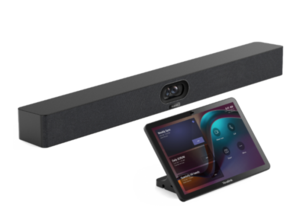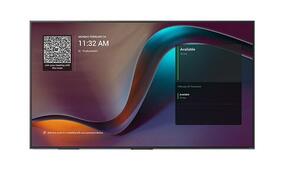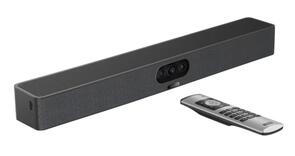
 Yealink MVC-S40-C5U-000 Video Conference System MTR with SmartVision S40 Video Bar, MCore Kit C5U Mini-PC, MTouch Plus Touch Console & RoomSensor
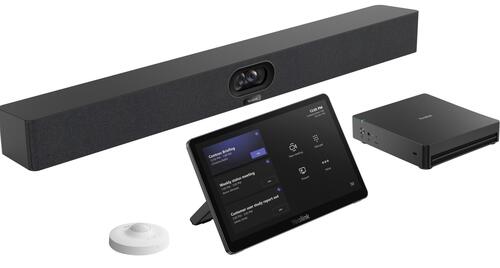
Yealink MVC S40 (MVCS40-C5U-000) 48MP/4K Dual-Eye Video Conference System - MTR on Windows
The Yealink MVC S40 C5U (MVCS40-C5U-000, vendor part number 1106893) is a complete Microsoft Teams Rooms on Windows video conferencing system for small to medium-sized meeting rooms. The package combines the fourth-generation Yealink MCore 4 mini-PC, MTouch Plus touch console, SmartVision 40 intelligent video bar and RoomSensor to provide professional video, full-duplex audio, convenient meeting control and automated room occupancy detection.
Complete Microsoft Teams Rooms solution for small and medium meeting rooms
Designed for rooms accommodating up to approximately 10 participants, the Yealink MVC S40 C5U provides the principal hardware required to create a native Microsoft Teams Rooms environment.
Users can start scheduled meetings, manage participants, control the camera and share content from the MTouch Plus console. The dedicated MCore 4 meeting-room PC eliminates the need to connect a separate computer for everyday Teams meetings.
A compatible room display, Microsoft Teams Rooms licence, Teams room account and wired network connection are required separately.
Dual 48MP SmartVision 40 intelligent video bar
The included Yealink SmartVision 40 combines two 48-megapixel cameras to produce a detailed panoramic image with a wide 120° diagonal field of view. Its dual-eye design provides balanced coverage across the meeting table, helping keep everyone visible without relying on a mechanically moving PTZ camera.
Intelligent video capabilities include:
-
IntelliFocus for real-time close-up views of recent speakers
-
Auto Framing to automatically compose the room view
-
Speaker Tracking to focus attention on active participants
-
Multi-Stream IntelliFrame support for individual participant video streams
-
Video Fence to define the meeting area and reduce outside distractions
-
Virtual Background functionality
-
Automatic electric lens privacy cover
Availability of individual Microsoft Teams AI features may depend on the installed software, system configuration and applicable Microsoft licensing.
Integrated microphones and full-duplex stereo audio
SmartVision 40 incorporates an eight-element MEMS beamforming microphone array with a voice pickup range of up to six metres. AI-enhanced noise cancellation and reverberation suppression help reduce distracting room noise and echo, while full-duplex audio allows participants at both ends of the meeting to speak naturally without cutting one another off.
Two integrated stereo speakers provide clear room audio without requiring separate tabletop speakers. The system also supports up to two compatible Yealink expansion microphones when additional voice coverage is needed.
Fourth-generation MCore 4 AI meeting-room PC
The MVC S40 C5U is powered by the Yealink MCore 4 mini-PC. Its Intel Core Ultra 5 125H processor and integrated NPU provide up to 34 TOPS of AI computing performance, creating a future-ready platform for AI-enhanced Microsoft Teams Rooms collaboration.
The MCore 4 includes 16GB of DDR5 memory, a 256GB SSD and Windows 11 IoT Enterprise. Three HDMI outputs support flexible multi-display room configurations, while integrated EDID and CEC support simplify display integration and room control.
Separate AV LAN and internet connectivity help provide a secure and structured deployment by separating room audio-visual devices from the organisation’s main network connection.
MTouch Plus Microsoft Teams meeting controller
The 11.6-inch Yealink MTouch Plus provides a dedicated touchscreen interface for starting and joining Teams meetings, managing participants, adjusting room controls and sharing content.
Its Full HD IPS display and adjustable 30° to 70° viewing angle make it suitable for a wide range of meeting-table layouts. The console supports desktop, fixed-desktop and wall-mounted installation, providing flexibility for permanent meeting-room deployments.
Wired content sharing is available through HDMI or USB-C, while compatible optional Yealink presentation accessories can provide wireless content sharing.
Included RoomSensor for automatic occupancy detection
The supplied Yealink RoomSensor detects when participants enter the meeting room, allowing the conferencing system to wake automatically and be ready for use. This reduces unnecessary interaction at the beginning of a meeting and helps create a more responsive, streamlined room experience.
Occupancy information can also help organisations understand whether meeting spaces are in use and support more effective management of shared rooms when used with compatible Yealink workspace management services.
The wireless sensor can be positioned in a suitable location within the room without requiring additional signal cabling.
Flexible content sharing and display options
Users can present content through the MTouch Plus HDMI or USB-C input or through the MCore 4 HDMI input. The MCore 4 provides three HDMI outputs, supporting single, dual or multi-display Microsoft Teams Rooms configurations.
Compatible Yealink wireless presentation devices can be added when cable-free content sharing is required. Supported functions may vary according to the selected accessory, system firmware and Microsoft Teams Rooms software.
Simplified installation and centralised management
The integrated Yealink room system architecture reduces the number of separate conferencing components required. The MCore 4 can be mounted on a wall, behind a display or positioned on a suitable surface, while the SmartVision 40 can be placed on a flat surface or installed using its wall-mounting hardware.
Yealink RoomConnect provides local configuration and device control, while compatible Yealink management platforms can assist with remote monitoring, configuration and firmware management.
Key features
-
Native Microsoft Teams Rooms on Windows video conferencing system
-
Designed for small to medium meeting rooms
-
Recommended for rooms with up to approximately 10 participants
-
Fourth-generation Yealink MCore 4 mini-PC
-
Intel Core Ultra 5 125H processor
-
Integrated NPU with up to 34 TOPS AI performance
-
16GB DDR5 memory and 256GB SSD
-
Windows 11 IoT Enterprise
-
SmartVision 40 all-in-one video bar
-
Dual 48MP camera system
-
Wide 120° diagonal field of view
-
IntelliFocus, Auto Framing, Speaker Tracking and Video Fence
-
Multi-Stream IntelliFrame support
-
Eight-element MEMS beamforming microphone array
-
Up to six-metre voice pickup range
-
AI-enhanced noise cancellation and reverberation suppression
-
Full-duplex audio with two integrated stereo speakers
-
Automatic electric camera privacy cover
-
11.6-inch Full HD MTouch Plus touch console
-
RoomSensor for automatic occupancy detection and system wake-up
-
HDMI and USB-C wired content sharing
-
Three HDMI display outputs with CEC support
-
Support for up to two compatible expansion microphones
-
Flexible table, wall and display mounting options
Technical specifications
| Specification | Details |
|---|---|
| Manufacturer | Yealink |
| Product | MVC S40 C5U Video Conference System |
| Model | MVCS40-C5U-000 |
| Vendor part number | 1106893 |
| Meeting platform | Microsoft Teams Rooms on Windows |
| Recommended room size | Small to medium meeting rooms |
| Recommended capacity | Up to approximately 10 participants |
| Included primary components | MCore 4, MTouch Plus, SmartVision 40 and RoomSensor |
| Camera system | Dual-camera Yealink SmartVision 40 |
| Camera resolution | 2 × 48MP |
| Maximum video resolution | 4K UHD |
| Camera field of view | 120° diagonal |
| Intelligent video features | IntelliFocus, Auto Framing, Speaker Tracking, Multi-Stream IntelliFrame, Video Fence and Virtual Background |
| Camera privacy | Automatic electric lens privacy cover |
| Digital zoom | Up to 6× |
| Built-in microphones | 8-element MEMS beamforming microphone array |
| Voice pickup range | Up to 6 metres |
| Audio processing | AI-enhanced noise cancellation, reverberation suppression and full-duplex audio |
| Built-in speakers | 2 × stereo speakers |
| Expansion microphones | Supports up to 2 compatible Yealink expansion microphones |
| Room PC | Yealink MCore 4 mini-PC |
| Processor | Intel Core Ultra 5 125H |
| AI processing | Integrated NPU with up to 34 TOPS |
| Memory | 16GB DDR5, configured as 2 × 8GB |
| Storage | 256GB SSD |
| Operating system | Windows 11 IoT Enterprise |
| Display outputs | 3 × HDMI with CEC support |
| Content input | HDMI input supporting up to 4K content sharing |
| USB connectivity | 4 × USB 3.0 |
| Touch-console connection | Dedicated Yealink MTouch RJ45/IP connection |
| Touch console | Yealink MTouch Plus |
| Touchscreen size | 11.6-inch IPS display |
| Touchscreen resolution | 1920 × 1080 |
| Touchscreen adjustment | 30° to 70° viewing angle |
| Wired content sharing | HDMI and USB-C |
| Wireless content sharing | Supported with compatible optional Yealink presentation accessories |
| Console installation | Desktop, fixed-desktop or wall-mounted |
| Occupancy sensor | Yealink RoomSensor |
| RoomSensor function | Detects room occupancy and supports automatic system wake-up |
| SmartVision 40 dimensions | 650 × 62 × 80mm |
| SmartVision 40 mounting | Flat-surface or wall mounting |
| Network requirement | Wired Ethernet network |
| Display requirement | Compatible HDMI display with 1080p or higher resolution, sold separately |
| Microsoft licensing | Microsoft Teams Rooms licence and room account required separately |
Package contents
-
1 × Yealink SmartVision 40 intelligent all-in-one video bar
-
1 × Yealink MCore 4 mini-PC
-
1 × Yealink MTouch Plus touch console
-
1 × Yealink RoomSensor
-
SmartVision 40 power adapter and connection cables
-
MCore 4 power adapter and connection cables
-
MTouch Plus connection accessories
-
Wall-mounting and installation hardware
-
Quick-start documentation
A meeting-room display, Microsoft Teams Rooms licence, Teams room account and network connection are not included. Optional wireless presentation accessories and expansion microphones are sold separately.