 QNAP TR-002 2 Bay USB-C Direct Attached Storage for PC or NAS
2 Bay USB Type-C Direct Attached Storage with Hardware RAID
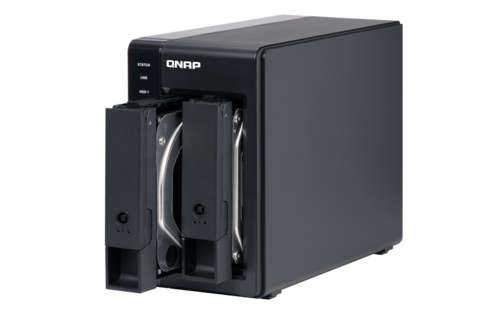
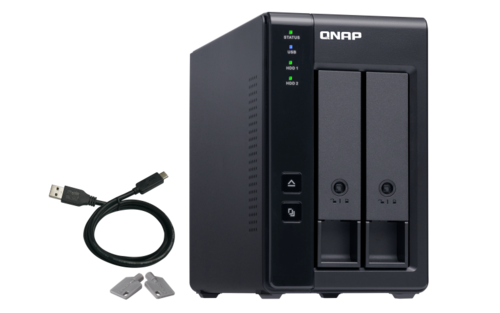
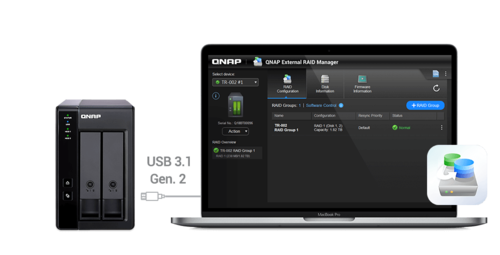
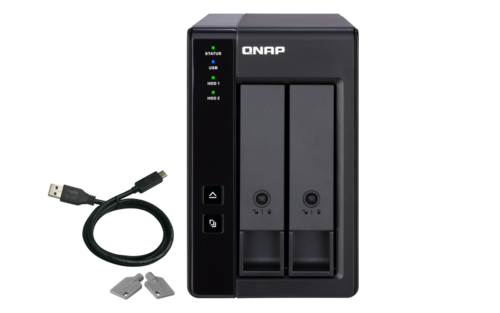
The TR-002 USB 3.1 Gen. 2 RAID expansion enclosure allows you to expand the capacity of your QNAP NAS and PC. The TR-002 can also be utilized as a DAS (Direct-attached Storage) device, allowing you to directly access its content just by connecting it via USB. The TR-002 features two 3.5-inch SATA drive bays with USB 3.1 Gen. 2 Type-C connectivity to bring you a highly-reliable and secure storage capacity expansion solution.
- USB 3.1 Gen. 2 Type-C port for faster data transfer.
- Supports up to two SATA drives.
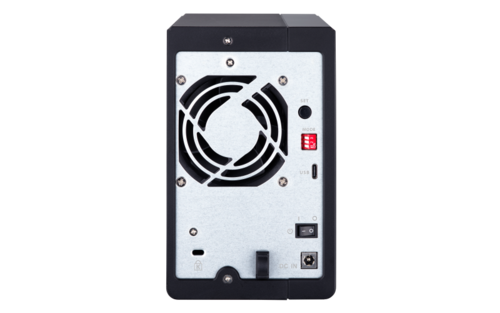
- Disk mode DIP switch to change from Hardware Control and Software Control configurations for setting RAID group.
- Lockable hard drive trays to prevent accidental drive removal.
- Eject button for disconnecting the TR-002 from a NAS or computer*.
*Requires the QNAP External RAID Manager utility.
USB 3.2 Gen 2 (10Gbps)
USB 3.2 Gen 2 Type-C port for faster data transfer. (Maximum 1M USB cable is recommended)
Supports SATA drives
Supports up to two SATA drives.
Disk mode DIP switch
Disk mode DIP switch to change from Hardware Control and Software Control configurations for setting RAID group.
Lockable drive trays
Lockable hard drive trays to prevent accidental drive removal.
Easy to eject
Eject button for disconnecting the TR-002 from a NAS or computer.
Effective storage expansion with RAID Support
The TR-002 is an ideal storage expansion solution for PCs, especially for laptops which lack the ability to install higher-capacity drives. Featuring two 3.5-inch SATA drive bays and supporting RAID configuration, the TR-002 provides the ability to store a vast number of files and data and to ensure protection against potential drive failure.
Instantly back up files from the TR-002 to the NAS using the One Touch Copy button**.
**Requires a QNAP NAS with a one touch copy button when in external drive mode. This feature will be supported from Q2 2019.
Effective storage expansion with RAID Support
The TR-002 is an ideal storage expansion solution for PCs, especially for laptops which lack the ability to install higher-capacity drives. Featuring two 3.5-inch SATA drive bays and supporting RAID configuration, the TR-002 provides the ability to store a vast number of files and data and to ensure protection against potential drive failure.
Supports various RAID levels
The TR-002 supports various RAID configurations. Depending on your requirements, you can switch between hardware- or software-controlled RAID modes. Move the DIP switches to corresponding positions for your ideal RAID mode: Individual, JBOD, RAID 0 or RAID 1. You can also configure the RAID settings from your QNAP NAS, or by using the QNAP External RAID Manager utility on your computer.
|
JBOD Connection Interface |
USB |
|
Main chip |
Micro processor with hardware RAID |
|
Drive Bay |
2 x 3.5-inch The system is shipped without HDD. |
|
Drive Compatibility |
3.5-inch bays: You can only use one disk type (HDD or SSD) in a RAID group. Combining different types of disk in one RAID group is not supported. |
|
Hot-swappable |
Yes |
|
USB 3.2 Gen 2 (10Gbps) Port |
1 x Type-C USB 3.2 Gen 2 10Gbps |
|
Form Factor |
Tower |
|
Dimensions (HxWxD) |
168.5 × 102 × 219 mm Dimensions do not include foot pad (foot pad may be up to 30mm / 1.18 inches high depending on model) |
|
Weight (Net) |
2.25 kg |
|
Weight (Gross) |
2.25 kg |
|
Operating Temperature |
0 - 40 °C (32°F - 104°F) |
|
Storage Temperature |
20 - 70°C (-4°F - 158°F) |
|
Relative Humidity |
5-95% RH non-condensing, wet bulb: 27°C (80.6°F) |
|
Power Supply Unit |
Minimum 36W adapter (12VDC), 100-240VAC |
|
Power Consumption: HDD Sleep Mode |
2.98 W |
|
Power Consumption: Operating Mode, Typical |
10.15 W Tested with drives fully populated. |
|
Fan |
1 x 70mm, 12VDC |
|
System Warning |
Buzzer |
|
Kensington Security Slot |
Yes |
|
QTS / QuTS hero |
Yes |
|
Windows |
Yes |
|
Ubuntu |
Yes |
|
Mac |
Yes |
|
Used as Hardware RAID (DAS) |
Yes |
|
Standard Warranty |
2 |
|
RAID 1 |
Yes |
|
RAID 0 |
Yes |
|
JBOD |
Yes |
|
Single Disk |
Yes |
|
JBOD Connection Interface |
USB |
|
Main chip |
Micro processor with hardware RAID |
|
Drive Bay |
2 x 3.5-inch The system is shipped without HDD. |
|
Drive Compatibility |
3.5-inch bays: You can only use one disk type (HDD or SSD) in a RAID group. Combining different types of disk in one RAID group is not supported. |
|
Hot-swappable |
Yes |
|
USB 3.2 Gen 2 (10Gbps) Port |
1 x Type-C USB 3.2 Gen 2 10Gbps |
|
Form Factor |
Tower |
|
Dimensions (HxWxD) |
168.5 × 102 × 219 mm Dimensions do not include foot pad (foot pad may be up to 30mm / 1.18 inches high depending on model) |
|
Weight (Net) |
2.25 kg |
|
Weight (Gross) |
2.25 kg |
|
Operating Temperature |
0 - 40 °C (32°F - 104°F) |
|
Storage Temperature |
20 - 70°C (-4°F - 158°F) |
|
Relative Humidity |
5-95% RH non-condensing, wet bulb: 27˚C (80.6˚F) |
|
Power Supply Unit |
Minimum 36W adapter (12VDC), 100-240VAC |
|
Power Consumption: HDD Sleep Mode |
2.98 W |
|
Power Consumption: Operating Mode, Typical |
10.15 W Tested with drives fully populated. |
|
Fan |
1 x 70mm, 12VDC |
|
System Warning |
Buzzer |
|
Kensington Security Slot |
Yes |
|
QTS / QuTS hero |
Yes |
|
Windows |
Yes |
|
Ubuntu |
Yes |
|
Mac |
Yes |
|
Used as Hardware RAID (DAS) |
Yes |
|
Standard Warranty |
2 |
|
RAID 1 |
Yes |
|
RAID 0 |
Yes |
|
JBOD |
Yes |
|
Single Disk |
Yes |